Once your solar panels are up on the roof and your system is switched on, there’s one question most homeowners ask pretty quickly:
“How do I know if my solar is actually working properly?”
Fair question.
You’ve made an investment in your home. You want to see what it’s doing, how much power it’s producing, and whether it’s saving you money. Years ago, solar could feel a bit invisible. The panels were on the roof, the inverter was on the wall, and unless you checked the electricity bill, you didn’t always know what was happening day to day.
These days, it’s much easier.
A solar monitoring app lets you track your system from your phone or computer. You can see how much energy your solar panels are producing, when your home is using power, how much electricity is going back to the grid, and whether your system is performing the way it should.
At Ballarat Solar Company, we always encourage homeowners to understand their monitoring app. You don’t need to become a solar expert, but knowing the basics can help you get more value from your system and spot issues early.
What Is a Solar Monitoring App?
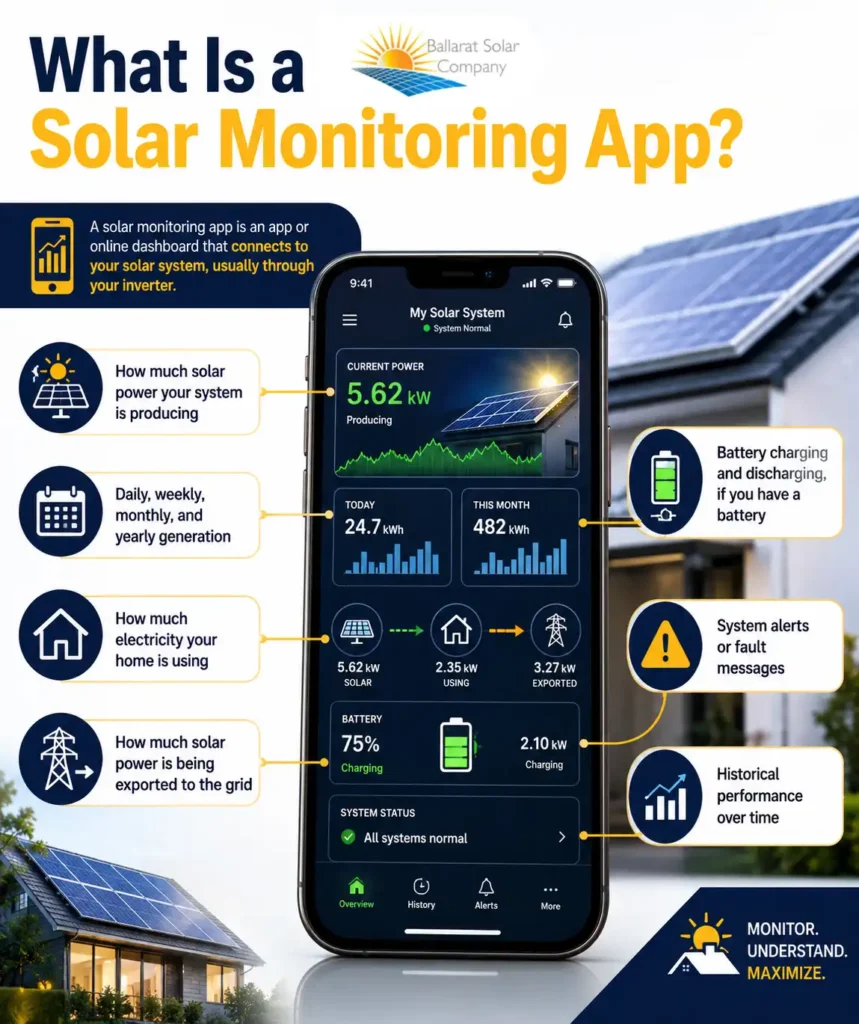
A solar monitoring app is an app or online dashboard that connects to your solar system, usually through your inverter.
Your inverter is the part of the system that converts the electricity generated by your panels into power your home can use. Most modern inverters have monitoring software that records your system’s performance and sends that data to an app.
Depending on the setup, your app may show:
- How much solar power your system is producing
- Daily, weekly, monthly, and yearly generation
- How much electricity your home is using
- How much solar power is being exported to the grid
- Battery charging and discharging, if you have a battery
- System alerts or fault messages
- Historical performance over time
This kind of solar panel monitoring gives you a clearer picture of what’s happening with your system instead of leaving you guessing.
For many homeowners, the best part is simply being able to open the app on a sunny day and see the system working. I’ll be honest; plenty of people check it more often than they expected at first. There’s something strangely satisfying about watching your roof produce power.
How Solar Monitoring Works
The process is fairly simple.
Your solar panels generate electricity from sunlight. That electricity flows to the inverter, which converts it into usable power for your home. The inverter then records information about how much energy is being produced.
From there, the data is sent to your monitoring app through your home internet connection, usually Wi-Fi or ethernet. Some systems may use a mobile network connection instead.
A solar inverter app is often the main place homeowners go to check their system. Different inverter brands have different apps, but most of them show similar information: energy production, system status, and historical performance.
Some setups only show solar generation. Others include consumption monitoring, which means you can also see how much power your household is using and when you’re using it. That extra information can be very handy if you want to adjust your habits and use more of your own solar power during the day.
What Can You Track in a Solar Monitoring App?
A good monitoring app can show quite a lot, but the main thing most people look at is solar production.
Solar Energy Production
This tells you how much electricity your system is generating.
You might see a live number showing how much power your system is producing right now, along with daily totals. For example, on a sunny summer day, you may see a nice smooth production curve that climbs through the morning, peaks around the middle of the day, and then drops away in the afternoon.
On cloudy days, that curve may look a bit more up and down. That’s completely normal.
Good solar energy monitoring helps you understand these patterns, so you know what’s normal for your home.
Household Energy Use
If your system has consumption monitoring installed, your app may also show how much electricity your home is using.
This is where things get really useful.
You can see when your household uses the most power and whether that usage lines up with your solar production. For example, running the dishwasher, washing machine, pool pump, or electric hot water during the day can help you use more of the solar energy you’re already producing.
The more solar you use directly in the home, the less electricity you need to buy from the grid.
Grid Export
When your solar panels produce more power than your home is using, the extra electricity is exported to the grid.
Your app may show how much energy has been sent back. This is different from total production. Your system might generate a certain amount during the day, but only some of that is used in the home and the rest is exported.
Understanding this difference helps when you’re looking at your power bill.
Battery Performance
If you have a solar battery, your app may show battery charge level, charging times, discharging times, and how much stored energy you’re using at night.
This can be helpful for seeing whether your battery is being charged properly during the day and whether it’s covering your evening usage as expected.
System Alerts
Many apps can also alert you if something is wrong.
For example, your inverter may go offline, your internet connection may drop out, or your system may show an error message. Sometimes the issue is simple. Sometimes it needs a professional check.
Either way, the app helps you notice the problem sooner.
Why Solar Monitoring Is Useful for Homeowners
The biggest benefit of solar monitoring is confidence.
Instead of waiting for your electricity bill to arrive, you can check your solar system performance whenever you like. You can see whether the system is producing power, how it performs across different weather conditions, and whether anything looks unusual.
Monitoring can also help you make smarter choices around energy use.
For example, if your app shows strong solar production between 10 am and 3 pm, that may be the best time to run larger appliances. If you can shift some usage into daylight hours, you may increase your solar savings.
It also helps you spot performance issues early. If your system suddenly produces much less power than usual on a clear day, that could be worth checking. It may be a shading issue, a dirty panel issue, an inverter setting, or something else.
Without monitoring, you may not notice until a bill comes in higher than expected
Common Things Homeowners Notice in Their App
One thing I always tell customers is this: don’t panic if the app changes from day to day.
Solar production naturally moves around depending on the weather, season, and time of day.
In Ballarat, you’ll usually see stronger generation in summer and lower generation in winter. That doesn’t mean anything is wrong. It’s just the difference in sunlight hours and sun angle.
Cloudy days will also cause dips. Sometimes you’ll see the graph jump up and down as clouds pass over. Again, totally normal.
Shade can make a big difference too. A tree, chimney, antenna, or neighbouring building can reduce output at certain times of day. This is why good system design matters from the beginning.
Another common issue is Wi-Fi dropouts. Sometimes the app may look like the solar system has stopped working, but the system itself is still producing power. The app just isn’t receiving data because the internet connection has dropped out.
That’s one of the first things to check before assuming there’s a major problem.
Why Your Solar App and Electricity Bill May Look Different
This is something that confuses a lot of homeowners.
Your solar app and your electricity bill may not show exactly the same numbers because they are often measuring different things.
Your app may show total solar production. Your electricity bill usually focuses on how much power you imported from the grid and how much solar you exported back to the grid.
Here’s the key difference:
If your solar system produces power and your home uses it straight away, that energy may never appear as an export on your bill. It has already been used inside the home.
So, your app might say your system produced a healthy amount of solar energy, while your bill only shows a smaller amount exported. That doesn’t mean the solar has disappeared. It usually means you used some of it directly, which is generally a good thing.
This is why a monitoring app is so helpful. It gives you a better understanding of the full picture.
What to Do If Your Solar App Shows a Problem
If your app shows an error or your system seems to be underperforming, there are a few simple things you can check first.
Start with the internet connection. If the inverter has lost Wi-Fi, the app may stop updating even though the system is still operating.
Next, compare performance with the weather. A cloudy winter day in Ballarat will not look the same as a sunny summer day, so try comparing similar days rather than expecting the same output all year round.
You can also check whether there are any obvious error messages in the app. Some apps will explain the issue clearly, while others are a bit more technical.
What you shouldn’t do is open electrical equipment or try to repair anything yourself. Solar systems involve electricity and should only be checked by qualified professionals.
If something looks unusual and you’re not sure, contact your installer. It’s always better to ask than ignore it.
Choosing a Solar System with Good Monitoring
If you’re still in the process of choosing solar, ask about monitoring before you go ahead.
Not all monitoring setups are the same. Some apps are simple and easy to use. Others are more detailed. Some show production only, while others show both production and household consumption.
Before choosing a system, it’s worth asking:
- Does the inverter come with an app?
- Will the app show live solar production?
- Can it show household usage as well?
- Will it work with a battery later?
- Will someone help set it up after installation?
- Who do I call if the app stops working?
A good solar company should explain this clearly. You shouldn’t be left with an app on your phone and no idea what the numbers mean.
How Ballarat Solar Company Helps
At Ballarat Solar Company, we want solar to feel simple, not overwhelming.
That includes helping you understand how your monitoring works. We can explain what the app shows, what normal production looks like, and what signs may point to an issue.
We also understand local conditions. Solar performance in Ballarat changes across the seasons, and that’s perfectly normal. Part of our job is helping homeowners know what to expect so they don’t worry unnecessarily.
A monitoring app is a great tool, but it’s even better when someone has taken the time to show you how to use it properly.
Final Thoughts
A solar monitoring app is one of the easiest ways to stay connected to your solar system.
It helps you track production, understand your energy habits, check your solar system performance, and notice potential issues early. Whether you’re using a basic solar inverter app or a more detailed monitoring setup with consumption and battery data, the goal is the same: to help you get more value from your solar investment.
Solar shouldn’t be a mystery. With the right system, the right setup, and the right support, you can clearly see what your panels are doing and how they’re helping your home.
Ask Ballarat Solar Company About Solar Monitoring
Thinking about solar, or want a system that’s easy to track and understand?
Contact us today to ask about solar systems with simple, reliable monitoring apps. We’ll help you choose the right setup, explain how the app works, and make sure you feel confident tracking your solar performance from day one.